原稿:语雀 · 生命周期钩子 · 原目录:Vue › Vue 知识点 › 生命周期钩子
笔记正文
以 ✔ Todo App 中 1.5.2 版本的代码为例子,在 app 和组件下加入钩子函数,给 app 实例的 data 加一个 message prop
Vue.component("my-todo-list", {
      props: /*...*/
      methods: /*...*/,
      },
      beforeUpdate() {
        console.group("beforeUpdate()==============》");
        console.log("%c%s", "color:red", "el:" + this.$el);
                console.log(this.$el);
        console.log("%c%s", "color:red", "data:" + this.$data);
        console.log("%c%s", "color:red", "message:" + this.message);
      },
      updated() {
        console.group("updated()==============》");
        console.log("%c%s", "color:red", "el:" + this.$el);
        console.log(this.$el);
        console.log("%c%s", "color:red", "data:" + this.$data);
        console.log("%c%s", "color:red", "message:" + this.message);
      },
      template: /*...*/
    });
var app = new Vue({
      el: "#app",
      data: {message:"hello world"},
      beforeCreate() {
        console.group("beforeCreate()==============》");
        console.log("%c%s", "color:red", "el:" + this.$el);
        console.log("%c%s", "color:red", "data:" + this.$data);
        console.log("%c%s", "color:red", "message:" + this.message);
      },
      created() {
        console.group("created()==============》");
        console.log("%c%s", "color:red", "el:" + this.$el);
        console.log("%c%s", "color:red", "data:" + this.$data);
        console.log("%c%s", "color:red", "message:" + this.message);
      },
      beforeMount() {
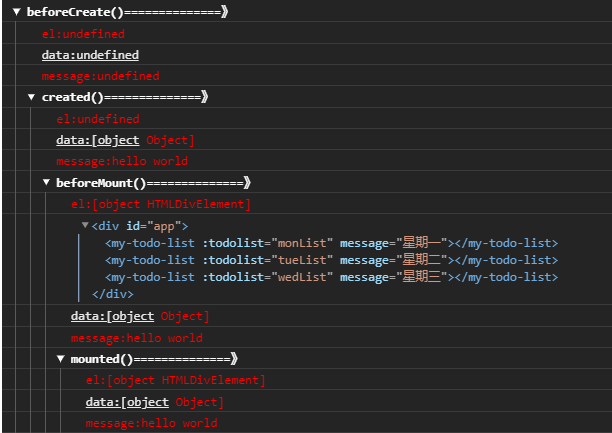
- 首先直接执行,查看结果,可以看到执行了
- beforeCreate:this.$el 不可访问,this.$data 不可访问
- created:this.$el 不可访问,this.$data 可访问
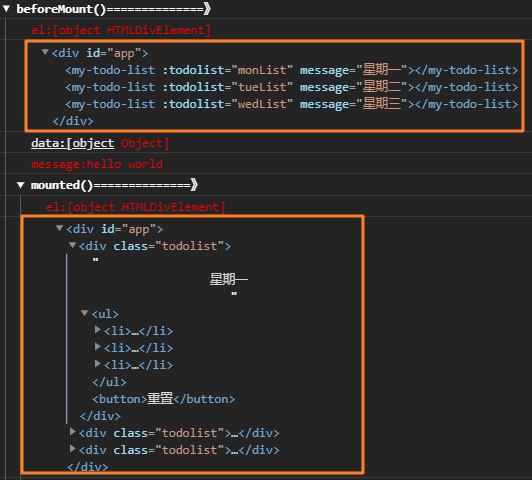
- beforeMount:this.$el 可以访问,this.$data 可访问
- mounted:this.$el 可以访问,this.$data 可访问
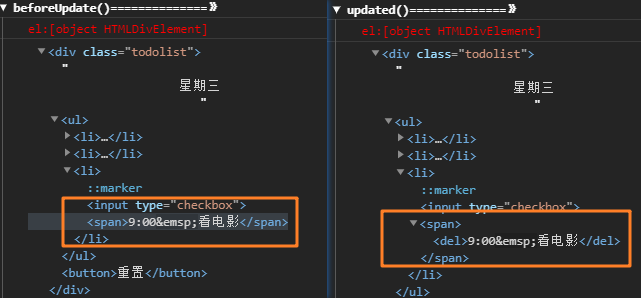
在组件上未设置这四个钩子,但实际上对于三个 my-todo-list 组件来说,这四个钩子同样会触发